Lodging a complaint on the Moniepoint App is one of the easiest ways to contact Moniepoint customer care to solve any issues you might have with your account or transactions. Whether it’s a failed transaction, app error, or any other problem, submitting a complaint ensures your concern is documented and addressed quickly.
This guide will show you step by step how to use Moniepoint app to contact customer care and resolve your issues easily, so you can get help without stress. By following this post, you will learn:
- How to access the Moniepoint App and log in.
- How to find the Help or Support section.
- How to use the Chat Moniepoint customer care and submit your complaint.
- Tips for following up and resolving issues faster.
Using this approach guarantees that your complaint is linked to your account, handled professionally, and resolved as quickly as possible.
Why You Should Lodge Complaints Through the App
Lodging complaints directly through the Moniepoint App comes with several benefits:
- Cheap and Convenient: Calling Moniepoint customer care to complain costs money: From being on queue to speaking to a rep can take 10 minutes, which is a lot of airtime. However, using your Moniepont app for the same issue costs less data at any time and place.
- Complaints are documented and tracked: Every issue you submit is officially recorded in the app. This makes it easier for the support team to follow up and ensures nothing gets lost.
- Faster resolution: Complaints submitted via the app are usually addressed quicker than calls or emails. The support team can access your account details immediately, which speeds up solutions.
- means you: Using the app keeps your personal and transaction information safe while resolving issues. You don’t have to share sensitive details over unverified channels.
By using the app for complaints, you save time, reduce stress, and get reliable support.
Steps to Lodge a Complaint on Moniepoint App
Step 1: Access your Moniepoint App
- Locate the Moniepoint App on your Android or iPhone smartphone and open it.
- Enter your login credentials carefully to access your account.
- Logging in links your complaint to your account, allowing the support team to handle your issue faster and more accurately.
Step 2: Go to the Help & Support Section
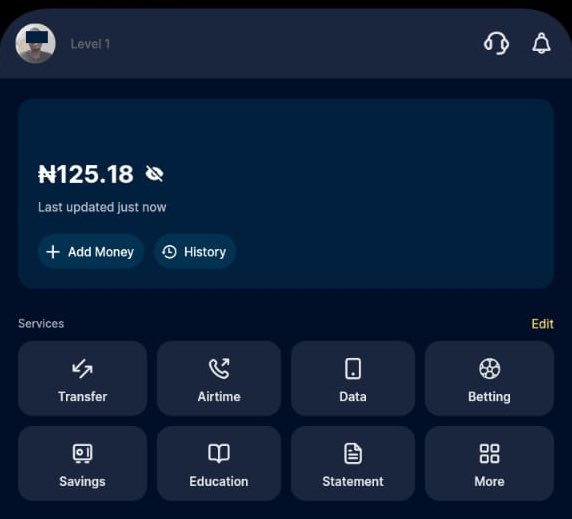
- Look for the Help and support at the top left in the main menu of the app. It is represented with a headset icon beside notification bell icon.
- This section contains FAQs, guides, and support options that can sometimes solve your problem without needing to submit a complaint.
- Take a moment to browse the FAQs before submitting your complaint. It might save you time.
Step 3: Chat with Moniepoint Customer Care
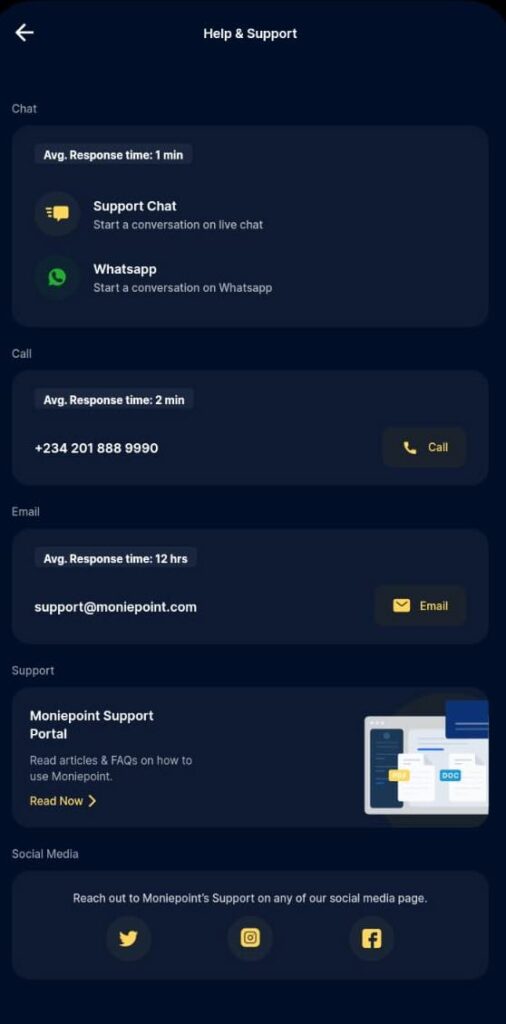
- Tap on the Support chat option to connect directly with a Moniepoint representative.
- Clearly explain your issue and provide necessary details such as transaction IDs, error messages, or dates.
- Be patient while the representative responds.
- Using the chat feature ensures your complaint is formally documented and handled professionally.
Step 4: Follow Up if Needed
- Check the status of your complaint in the app if you don’t get an immediate response.
- If the issue isn’t resolved promptly, escalate it through the app or consider contacting Moniepoint customer service via email or phone.
Common Issues Users Face When Lodging Complaints
While using the Moniepoint App to lodge complaints is usually smooth, some users may face challenges. Here are common issues and tips to solve them:
- App crashes or chat feature not working
- Make sure your app is updated to the latest version with good internet connection.
- Restart your phone and try again.
- If it persists, contact Moniepoint customer service via email or phone.
- Delayed response from support
- Some complaints may take longer depending on the complexity of the issue.
- Stay patient and check the chat regularly for updates.
- Complaints not linked to the correct account
- For those using Monipoint Business and personal accounts, double-check that your account details are correct to ensure the support team can track and resolve your issue.
By knowing these potential issues, you can prepare and avoid delays in getting your complaint resolved.
Alternative Ways to Contact Moniepoint Customer Care
If you cannot lodge a complaint through the Moniepoint App or need extra support, you have several alternatives:
- Contact Moniepoint customer service via phone or email
- Reach out to the official Moniepoint support channels to report your issue.
- Provide all necessary details like your account info, transaction ID, and a clear description of the problem.
- If your complaint is urgent or not resolved online, visiting an office ensures your issue is handled in person.
- Use social media support channels
- Moniepoint also respond to complaints via official social media platforms.
- Always confirm that the social media account is official before sharing sensitive information.
For more, read on Ways to Contact Moniepoint Customer Care
FAQs
Here are the answers to five common questions on lodging complaints on the Moniepoint bank app:
- How long does it take for Moniepoint to respond to complaints?
According to Moniepoint, the average response for in-app chat is 1 minute. However, resolving your issues can range from a few minutes to 48 hours, depending on the nature of the issue. - Can I lodge a complaint without logging into the app?
No. You must sign-in too your Moniepoint account to lodge a complaint. If you cannot access your account, use other methods to reach out to Moniepoint customer care, such as Phone, email, social media and WhatsApp. - What details should I include when submitting a complaint?
Include key information such as your transaction ID, date and time of the issue, amount involved, and a clear description of the problem. - What if my complaint is not resolved via chat?
You can escalate the issue by contacting Moniepoint customer service via email, phone, or visiting a nearby office. - Is lodging a complaint free on Moniepoint App?
Yes, submitting a complaint through the app is completely free.
Summary
Moniepoint makes it easy and secure to lodge a complaint directly through its app. By chatting with the customer care via the app about your complaints, you ensure your issues are documented, tracked, and handled quickly by the support team.
Key Points to Remember:
- How to lodge a complaint: Open the Moniepoint App, log in, go to Help & Support section, and use the Support Chat feature to message a customer car representative.
- Complaints are documented and linked to your account for faster resolution.
- Using the app is usually faster than calling or emailing customer service.
- Be clear and provide necessary details like transaction IDs, amounts, and error messages.
- If needed, you can follow up in the app or use alternatives like phone, email, or visiting a Moniepoint office.
unleash.com.ng is dedicated to providing valuable information on managing your finances. Keep an eye out for future articles on Moniepoint and other helpful financial topics!
If you have any questions or need further assistance, feel free to ask in the comments below or on the Facebook page.
Leave a Reply